Redesigning a Research Repository
A UX case study exploring how to improve the information architecture and user experience of Figshare.
Full case study
Overview
Figshare is a leading research repository platform used by academic institutions worldwide to store, share, and preserve research outputs. As part of a comprehensive redesign initiative, I led the research and design efforts to reimagine how researchers organize and manage their Projects and Collections, two critical features that enable collaboration, curation, and research dissemination.
This case study examines the user research process, key insights discovered, and the strategic approach taken to address long-standing usability issues that were impacting researcher workflows across institutions.
Problem statement
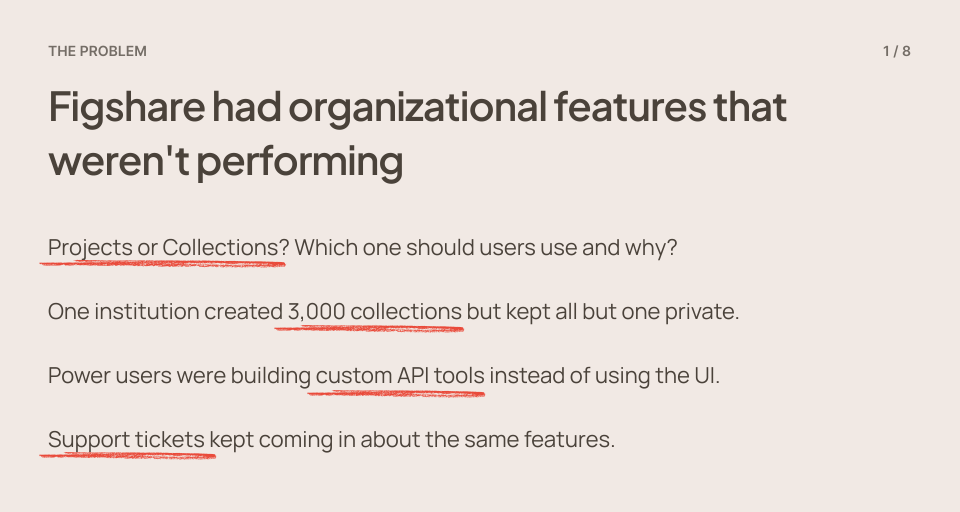
Figshare's Projects and Collections features had become pain points for users across institutions. While collections were widely adopted for curating research outputs, Projects suffered from low engagement and confusion about their purpose. Multiple institutions reported critical issues that were hindering their ability to effectively organize and share their research.
How might we redesign the Projects and Collections experience to better serve diverse institutional needs while addressing fundamental usability issues that prevent researchers from effectively organizing and sharing their work?
Research approach
To understand the full scope of user needs and pain points, I conducted a comprehensive research initiative combining qualitative interviews, internal stakeholder consultations, and usage data analysis.
1
User interviews
8 in-depth interviews with Repository Managers, Metadata Specialists, and research Support Teams from institutions including Monash University, Loughborough University, Open University, and others.
2
Internal consultations
Conversations with company departments that communicate with users on a daily basis such as Sales, Customer Success, and Product Teams to understand common feature requests and support tickets.
3
Usage analysis
Reviewed usage data across institutions to identify patterns in how Projects and Collections were being utilized.
4
Prototype ideation
Conducted moderated usability sessions with AI-generated lo-fi prototypes to explore ideas and suggestions.
Participant Segmentation
Participants represented diverse use cases and institutional needs:
High-volume users: Institutions managing thousands of Projects (e.g., Macquarie University with nearly 3,000 collections);
Specialized workflows: Teams using Projects for unique purposes like internal funding documentation (Scholarship Exchange);
Research data managers: Staff managing both research data repositories and institutional collections;
External collaborators: Researchers working with partners outside their institutions who needed access to private Projects.
Interview focus areas
Current workflows and pain points;
Collaboration challenges across institutions;
Unused features and workarounds;
Custom API tools and their purpose.
I recorded interviews (with consent) for later analysis, looking for patterns in actual behavior, repeated friction points, and creative workarounds that revealed unmet needs.
Using Dovetail, I systematically coded transcripts, then collaborated with the Product Manager to synthesize findings. We focused on patterns that appeared across multiple institutions and user types, those were the insights we could design around with confidence.
Key research findings
Through the research process, several critical patterns emerged that revealed why the current system was failing users and what needed to change.
Finding 1: The search functionality crisis
Search functionality was repeatedly identified as the most significant pain point. Users described it as "broken," "confusing," and "inconsistent." The system would work with certain search parameters but fail with others, adding an extra space could break the entire search. This unpredictability forced users to develop workarounds, including building custom external applications using the Figshare API.
"They basically hate the search functionality which I mean has come up several times obviously in user meetings."
Research participant - Customer Success
Impact
One institution created a custom app pulling from Figshare's API specifically to work around search limitations.
Users couldn't reliably find their own content, defeating the purpose of an organizational system.
Sometimes search worked, sometimes it didn't, with no clear explanation.
Finding 2: No persistent identifier = unusable feature
One institution had 3,000 organized collection but only one was public. They kept 2,999 private because without identifiers, there was no point making them public as they couldn't be cited.
Projects lacked DOIs (Digital Object Identifiers), which are essential for academic citation and discovery. This was a critical gap because institutions promoted Figshare as a collaboration tool, yet researchers couldn't cite or share project work through standard academic channels. The workaround (creating a project and then adding it to a collection, which does have a DOI) was counterintuitive and confusing.
"What they find odd, I think, is that we offer collaboration features, but there's no persistent identifier with a project."
Research participant - Customer Success
"The lack of a DOI is the main reason we don't proactively encourage people to use certain organizational features. For a lot of researchers, that's really important."
Research participant - Repository Manager
Finding 3: The word "collaboration" set wrong expectations
Users heard "collaboration" and expected Google Docs real-time co-authoring with multiple cursors in the same document. What we actually offered was asynchronous file sharing with comments. We needed honest communication about our collaboration model: collaboration in parallel rather than real-time collaboration is probably the best way to define what we currently offer.
"There is sometimes an expectation that you could author within the authoring technology... that, you know, that I always said that would be amazing but I think we're probably quite away from that."
Research participant - Researcher
What users actually needed
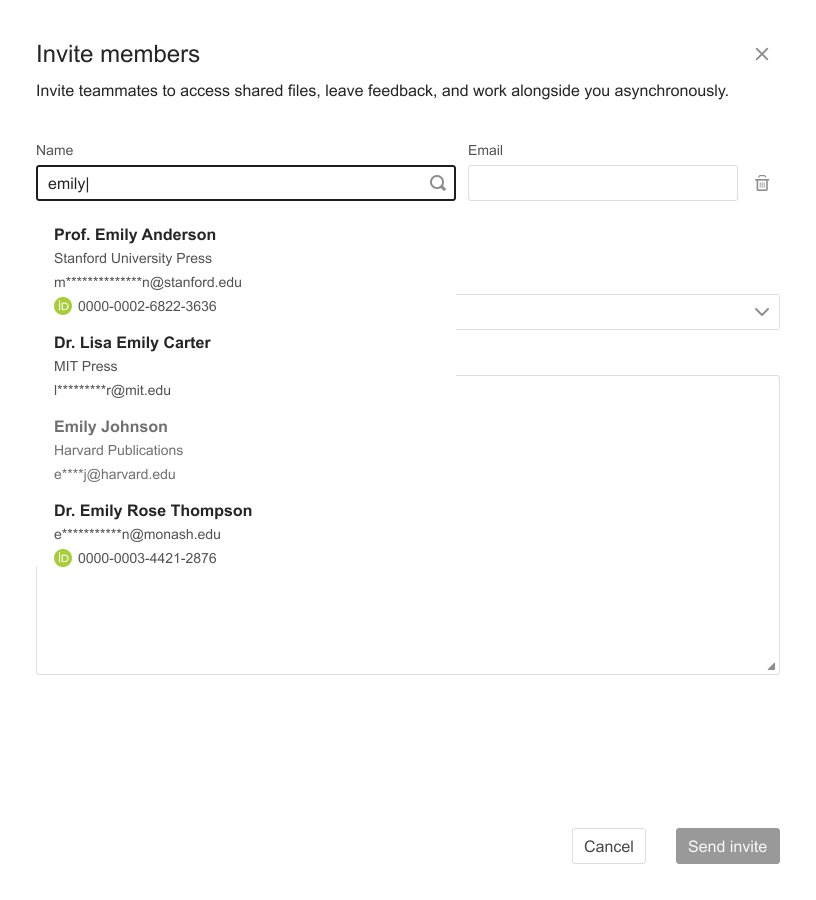
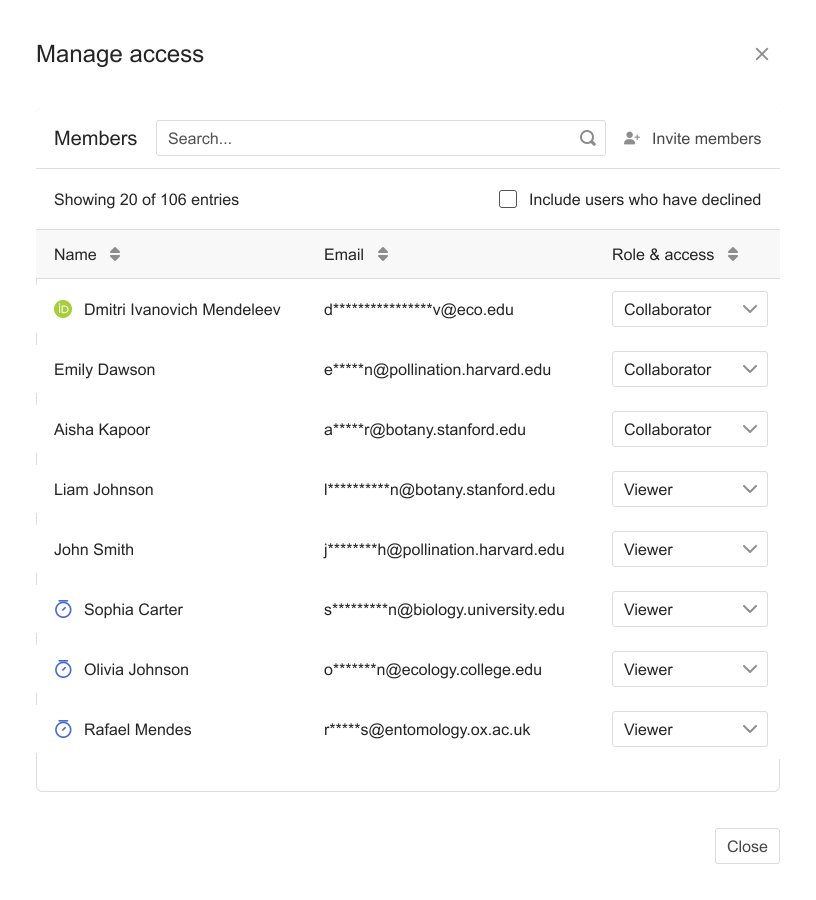
Ability to add external collaborators who aren't institution employees;
Simple permission management for people who can view, edit, and publish;
A space to stage research outputs before final publication without duplicating upload work.
Finding 4: The need for customization and visual identity
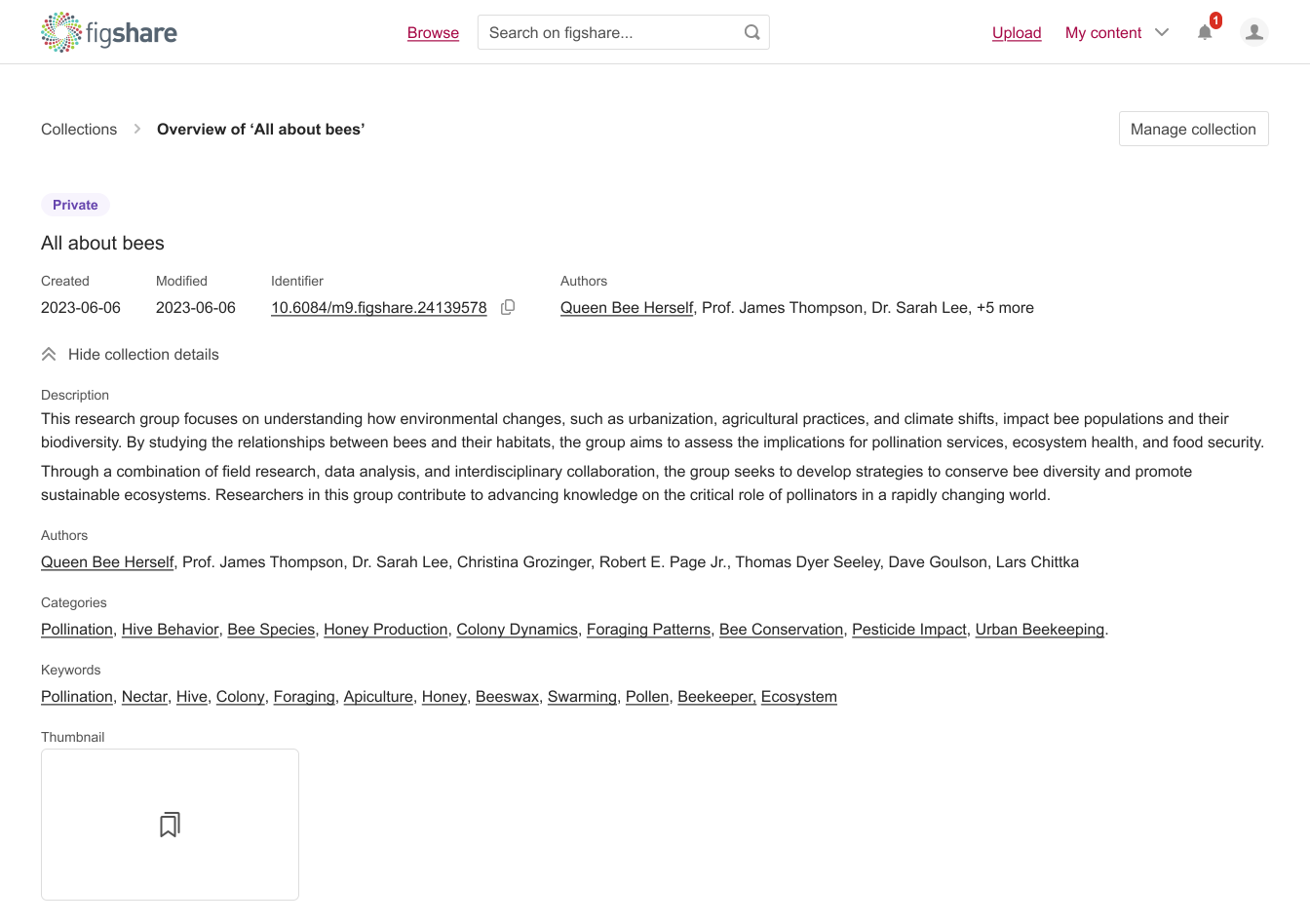
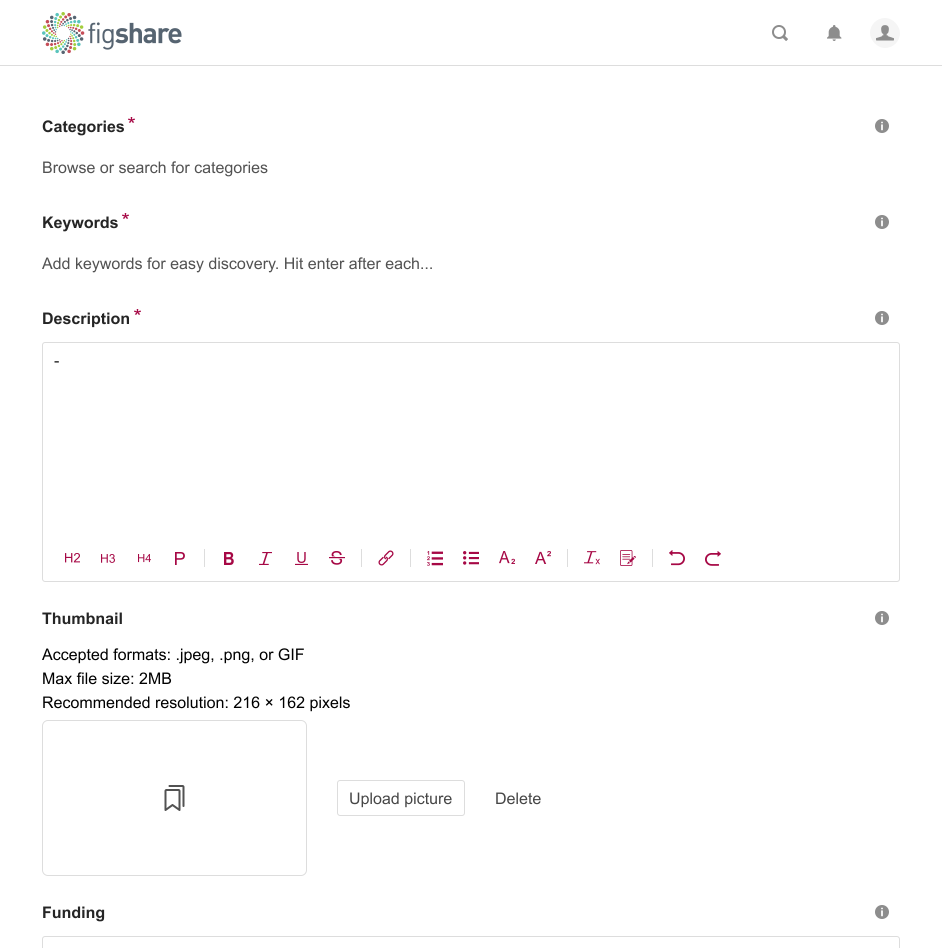
Multiple users requested the ability to customize thumbnails for Projects and Collections. With dozens or hundreds of items, generic thumbnails made it difficult to quickly identify specific Projects. This was especially problematic for institutions with similar project names or large volumes of content.
"Customizing the thumbnail would be lovely. That could be another one of my wish lists."
Research participant - Researcher
Pain points
Hundreds of Projects with similar names were difficult to distinguish
Generic thumbnails provided no visual cues for content identification
Users wanted to establish visual branding for research centers and departments
Finding 5: Version management confusion
The interface didn't clearly indicate whether changes were saved or published. Users split between two mental models: auto-update (like Google Docs) vs. explicit versioning (like GitHub). We needed to accommodate both without confusing either group.
Finding 6: Institutional context matters
The research revealed that Projects served dramatically different purposes across institutions. One institution used them to archive internal funding documentation (often single-document projects that could have been better served as standalone items). Meanwhile, another institution used Projects primarily for external collaboration scenarios where multiple institutions needed shared upload access.
Design solutions
Based on research findings, I designed a comprehensive redesign addressing core usability issues while accommodating diverse use cases.
Improved the search and filter functionality
This improvement focused largely on backend enhancements to make search and filtering faster, more accurate, and more reliable. We refined our search logic, optimized database queries, and restructured how filters are processed so results load more quickly and consistently. Most of the work happened behind the scenes, but it lays the foundation for a smoother user experience.
Clear persistent identifier communication
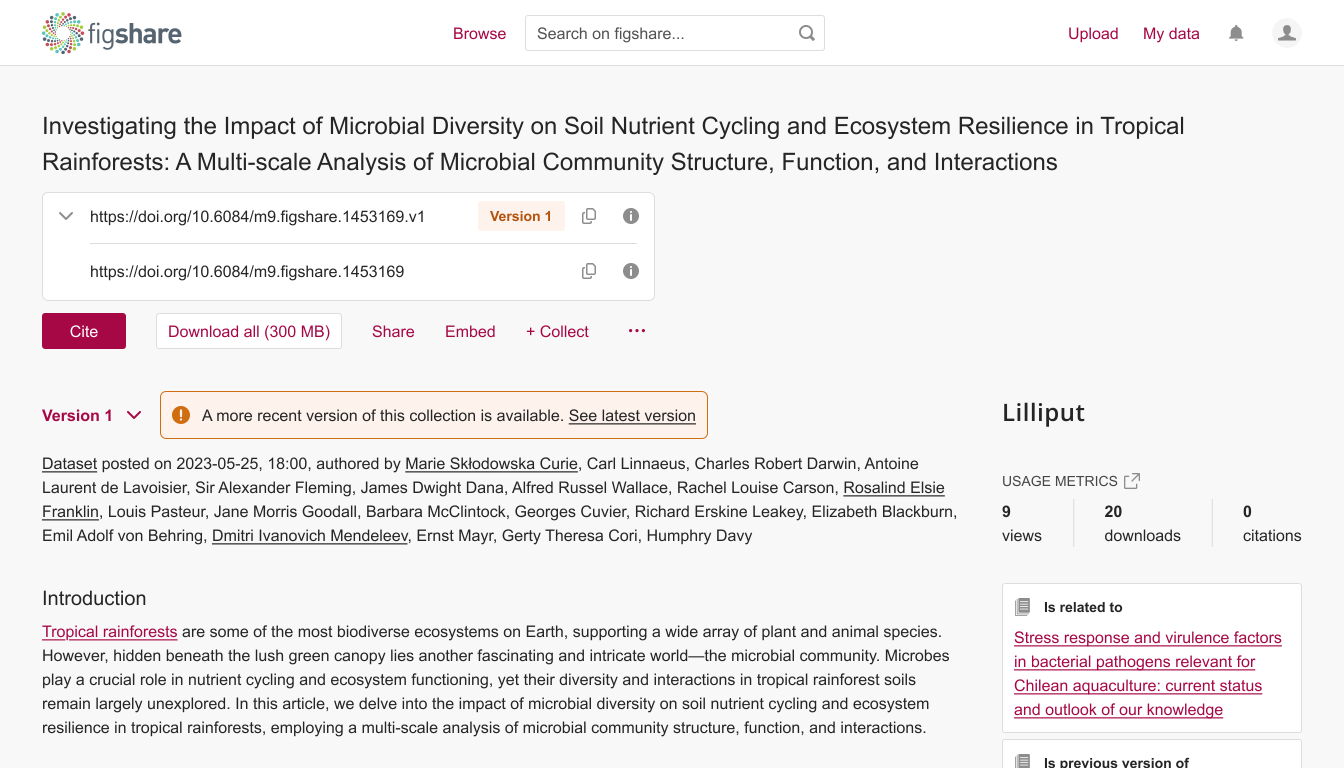
Items and collections all now have a persistent identifier with progressive disclosure and clear visual distinction between identifier types and versioning.
Clear expectations around collaboration
The support documentation for Projects has been updated to more accurately reflect their purpose: enabling asynchronous collaboration with both internal and external participants.
Customization options
Added thumbnail customization and visual presentation controls directly in the UI.
Version state clarity
Designed clear version indicators showing current state of a collection based on the items' versions.
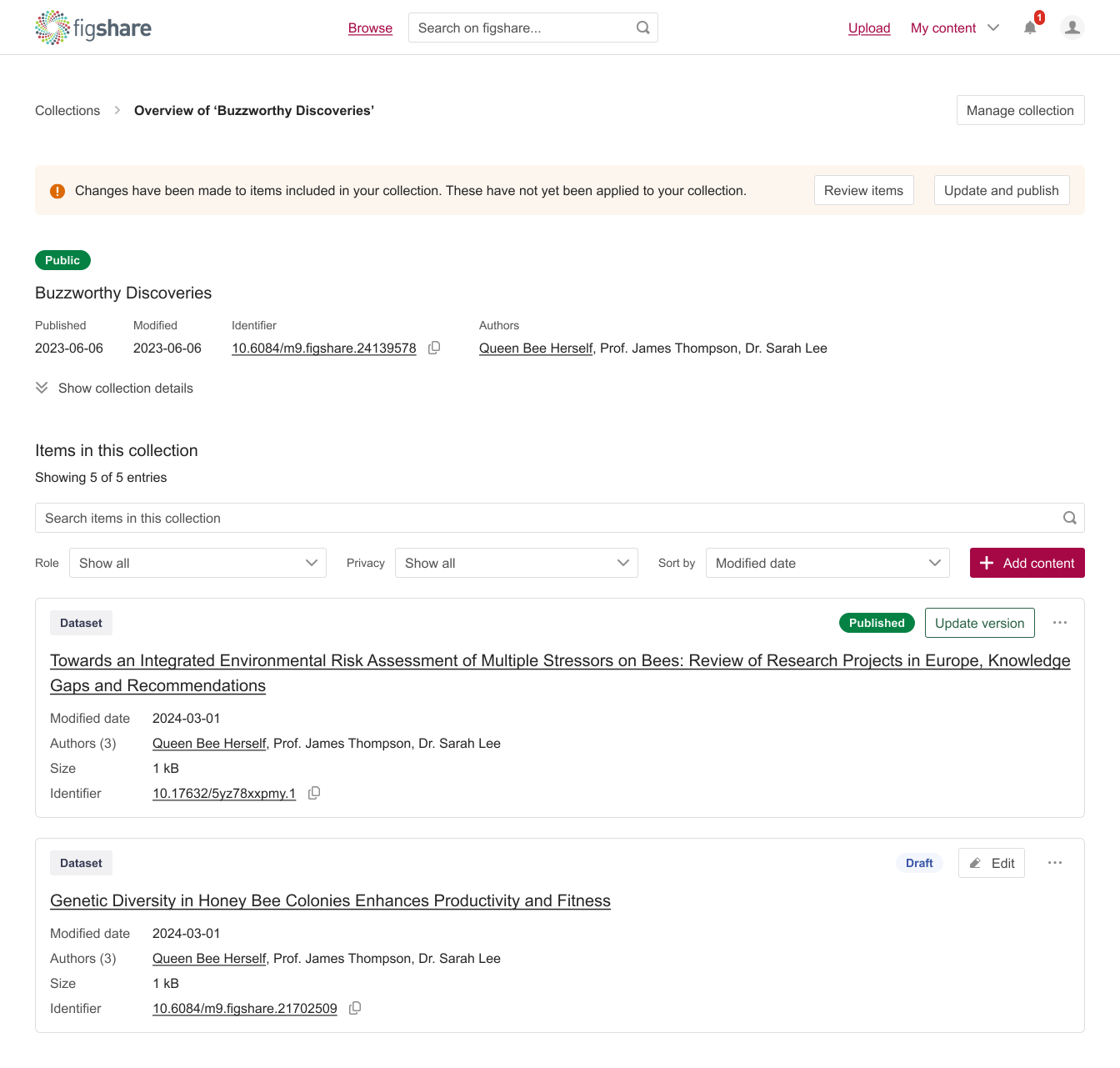
A collection's interface with collection versioning, item versioning, persistent identifiers displayed on collections and items, and progressively disclosed collection details.
Use-case-driven design
Created distinct page layouts optimized for curators, researchers, and collaborators. Flexible metadata displays showed relevant information based on context. Progressive disclosure reduced cognitive load.
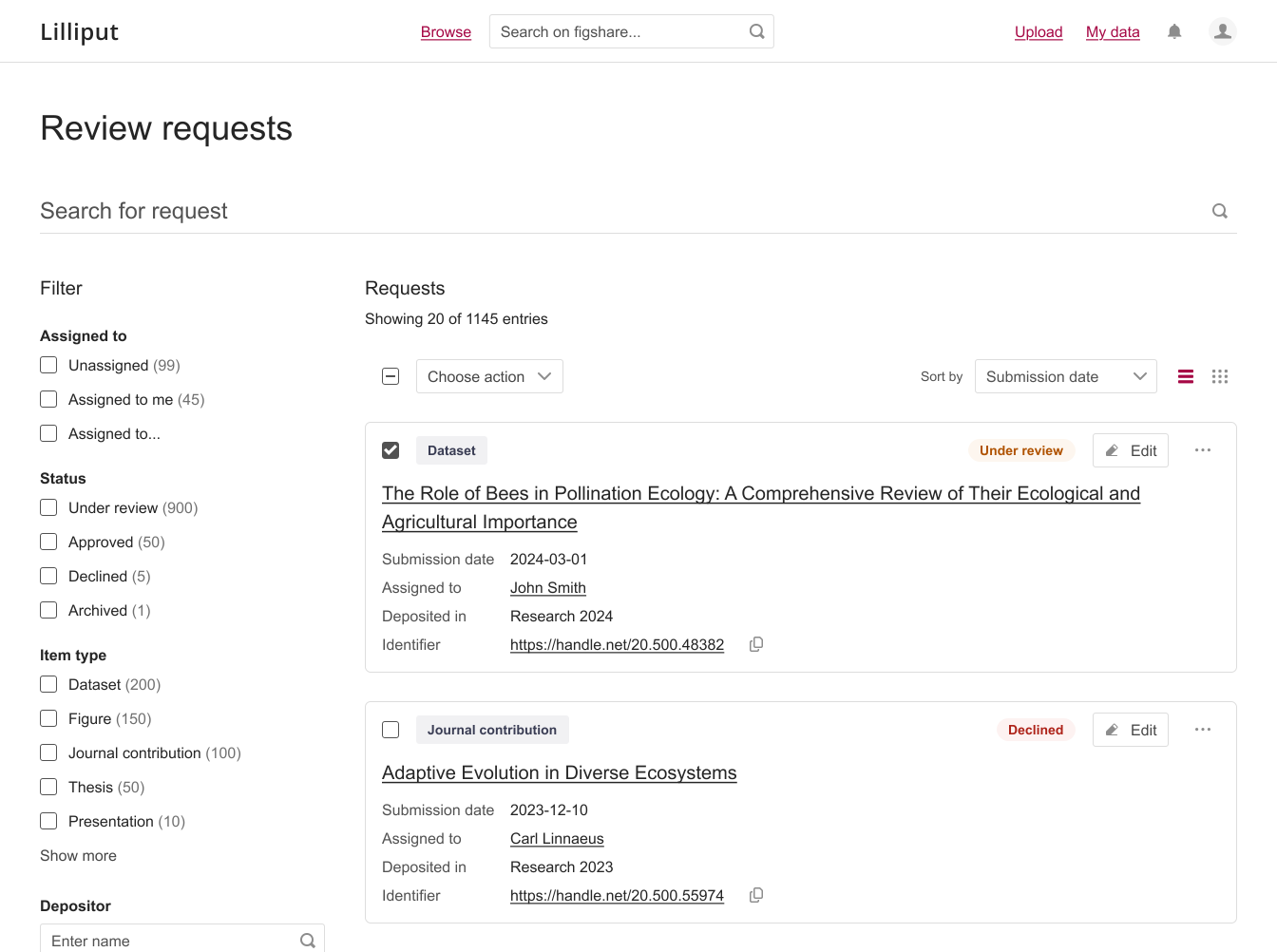
Page that supports curators in organizing and handling incoming review submissions.
When a "simple fix" isn't that simple
An interesting challenge we weren’t able to fully solve was DOI display for Projects. The most straightforward fix: Why not give Projects their own DOI? That would have introduced even more confusion between Projects and Collections. Eliminating one of the two wasn’t an option either as institutions rely on them differently, and the technical complexity would have been substantial.
So we made a conscious compromise: keep Projects for collaboration, keep Collections for publication. This preserves clarity for users while avoiding large-scale structural changes.
Validation & results
I conducted usability testing with 5 institutional users representing different use cases and regions.
Testing results:
23 usability tests conducted, covering multiple tasks and workflows;
100% task completion rate (up from 60% baseline)
Comment usability: 4/5 (up from 0/5)
Version management errors eliminated (0% vs. 40% previously)
Users reported feeling "heard" in the design
Key learnings
When a user builds a custom app to work around your platform's limitations, that's not only a feature request but a critical failure point. These workarounds revealed both the depth of user need and the specific functionality gaps that were most painful.
The same feature (Projects) served wildly different purposes across institutions. Understanding institutional context, workflows, and constraints was essential to designing flexible solutions rather than prescriptive ones.
Initial assumptions about how Projects were being used (for active collaboration) didn't match reality (often for staging content before publication or providing external access). Testing prototypes early helped course-correct before significant development resources were committed.
Engaging internal teams (Sales, Customer Success, Support) alongside users provided critical context about common issues, edge cases, and the history of why certain decisions were made. This prevented redesigning solutions to problems that had already been tried and failed.