Role
Team
Timeline
Design Lead
Product
12 months
100% task completion rate
up from 60% baseline
0% versioning errors
down from 40%
Overview
Figshare is a research repository platform used by academic institutions worldwide as both an institutional repository and data repository solution. Established open access repository launched in 2011 where researchers can preserve and share research outputs including figures, datasets, images, and videos.
As part of a comprehensive redesign initiative, I led the research and design efforts to reimagine how researchers organize and manage their content and features that enable collaboration, curation, and research sharing.
This case study examines the user research process, key insights discovered, and the strategic approach taken to address long-standing usability issues that were impacting researcher workflows across institutions.
Problem statement
Figshare's My Data feature had accumulated critical issues over several years that were hindering researchers' ability to effectively organize and share their work. The need to migrate the frontend to a newer version of React presented an opportunity to address these long-standing problems systematically.
Usability & user experience
Core workflows had fundamental issues reported repeatedly by users and the product team;
Collaboration features were so difficult to find that users were unaware they existed;
Information architecture lacked clear grouping, making content difficult to scan and understand;
Projects suffered from low engagement due to confusion about their purpose;
Multiple institutions reported that Collections, while widely adopted, had significant pain points.
Accessibility & consistency
Accessibility barriers flagged by both users and an external audit;
Layout inconsistencies across the interface created a disjointed experience.
Feature gaps
Frequently requested capabilities remained unaddressed, limiting what researchers could accomplish
How might we redesign My Data to not only resolve technical debt but also create an intuitive, accessible experience that helps researchers across diverse institutions organize, curate, and share their work?
Research approach
To understand the full scope of user needs and pain points, I conducted a comprehensive research initiative combining qualitative interviews, internal stakeholder consultations, and usage data analysis.
1
User interviews
12 in-depth interviews with Repository Managers, Metadata Specialists, and research Support Teams from institutions including Monash University, Loughborough University, Open University, and others.
2
Internal consultations
Conversations with internal departments that communicate with users on a daily basis such as Sales, Customer Success, and Product Teams to understand common feature requests and support tickets.
3
Usage analysis
Reviewed usage data across institutions to identify patterns in how certain features were being used, including click-through rates, to assess their adoption and popularity.
Interview focus areas
Had users walk through their typical workflows, as a baseline;
Surfaced pain points and gaps between current functionality and user needs;
Discussed collaboration challenges, especially when working across institutions;
Validated our assumptions about why certain features saw low adoption.
With user consent, I recorded and reviewed interviews to spot patterns: How do people really work? Where are they struggling? What workarounds have they come up with? What are they trying to achieve?
My PM and I worked through the findings, then brought in the rest of the development team to reality-check the effort involved: Phase 1 essentials, bigger efforts pushed to Phase 2, small meaningful wins if we have extra time, and ditched the high-effort/low-impact.
Key research findings
Through the research process, several critical patterns emerged that revealed why the current system was failing users and what needed to change.
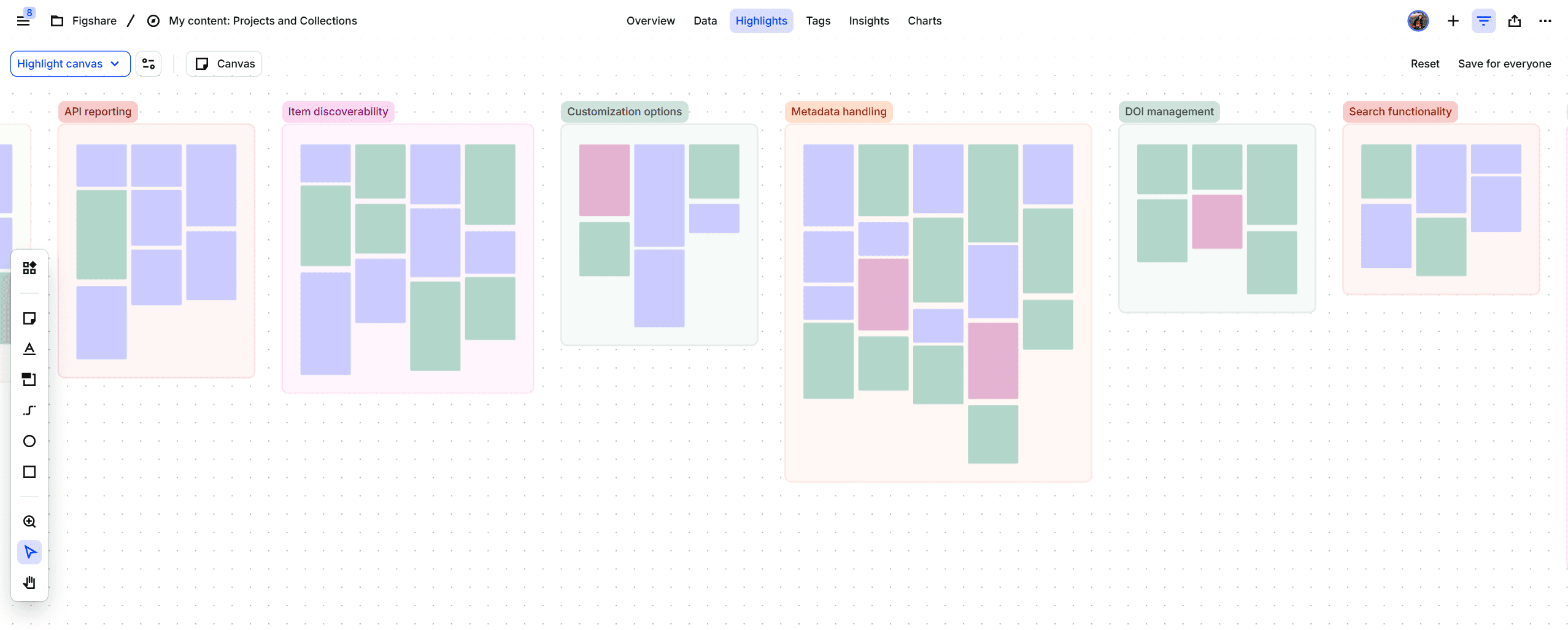
Dovetail canvas with organized user feedback into clustered data.
Finding 1: The search functionality crisis
Search functionality was repeatedly identified as the most significant pain point. Users described it as "broken", "confusing", and "inconsistent". The system would work with certain search parameters but fail with others (e.g. adding an extra space could break the entire search). This unpredictability forced users to develop workarounds, including building custom external applications using the Figshare API.
"They basically hate the search functionality which I mean has come up several times obviously in user meetings."
Research participant - Customer Success
Finding 2: No persistent identifier = unusable feature
One institution had 3,000 organized collection but only one was public. They kept 2,999 private because without identifiers, there was no point making them public as they couldn't be cited.
"What they find odd, I think, is that we offer collaboration features, but there's no persistent identifier with a project."
Research participant - Customer Success
Projects lacked DOIs (Digital Object Identifiers), which are essential for academic citation and discovery. This was a critical gap because institutions promoted Figshare as a collaboration tool, yet researchers couldn't cite or share project work through standard academic channels. The workaround (creating a project and then adding it to a collection, which does have a DOI) was counterintuitive and confusing.
"The lack of a DOI is the main reason we don't proactively encourage people to use certain organizational features. For a lot of researchers, that's really important."
Research participant - Repository Manager
Finding 3: The word "collaboration" set wrong expectations
Users heard "collaboration" and expected Google Docs real-time co-authoring with multiple cursors in the same document. What we actually offered was asynchronous file sharing with comments. We needed honest communication about our collaboration model: collaboration in parallel rather than real-time collaboration is probably the best way to define what we currently offer.
"There is sometimes an expectation that you could author within the authoring technology, that, you know, that I always said that would be amazing but I think we're probably quite away from that."
Research participant - Researcher
Finding 4: The need for customization and visual identity
Multiple users requested the ability to customize thumbnails for Projects and Collections. With dozens or hundreds of items, generic thumbnails made it difficult to quickly identify specific Projects. This was especially problematic for institutions with similar project names or large volumes of content.
"Customizing the thumbnail would be lovely. That could be another one of my wish lists."
Research participant - Researcher
Finding 5: Version management confusion
The interface didn't clearly indicate whether changes were saved or published. Users split between two mental models: auto-update (like Google Docs) vs. explicit versioning (like GitHub). We needed to accommodate both without confusing either group.
Finding 6: Some features are hard to find
Our assumptions were proven right: Notes saw almost no use because it was hidden behind a hover interaction. Users also pointed out that "Comments" made more sense in a collaboration context. Editing an item was also an Easter Egg hunt.
Design solutions
Based on research findings, I designed a comprehensive redesign addressing core usability issues while accommodating diverse use cases.
Improved the search and filter functionality
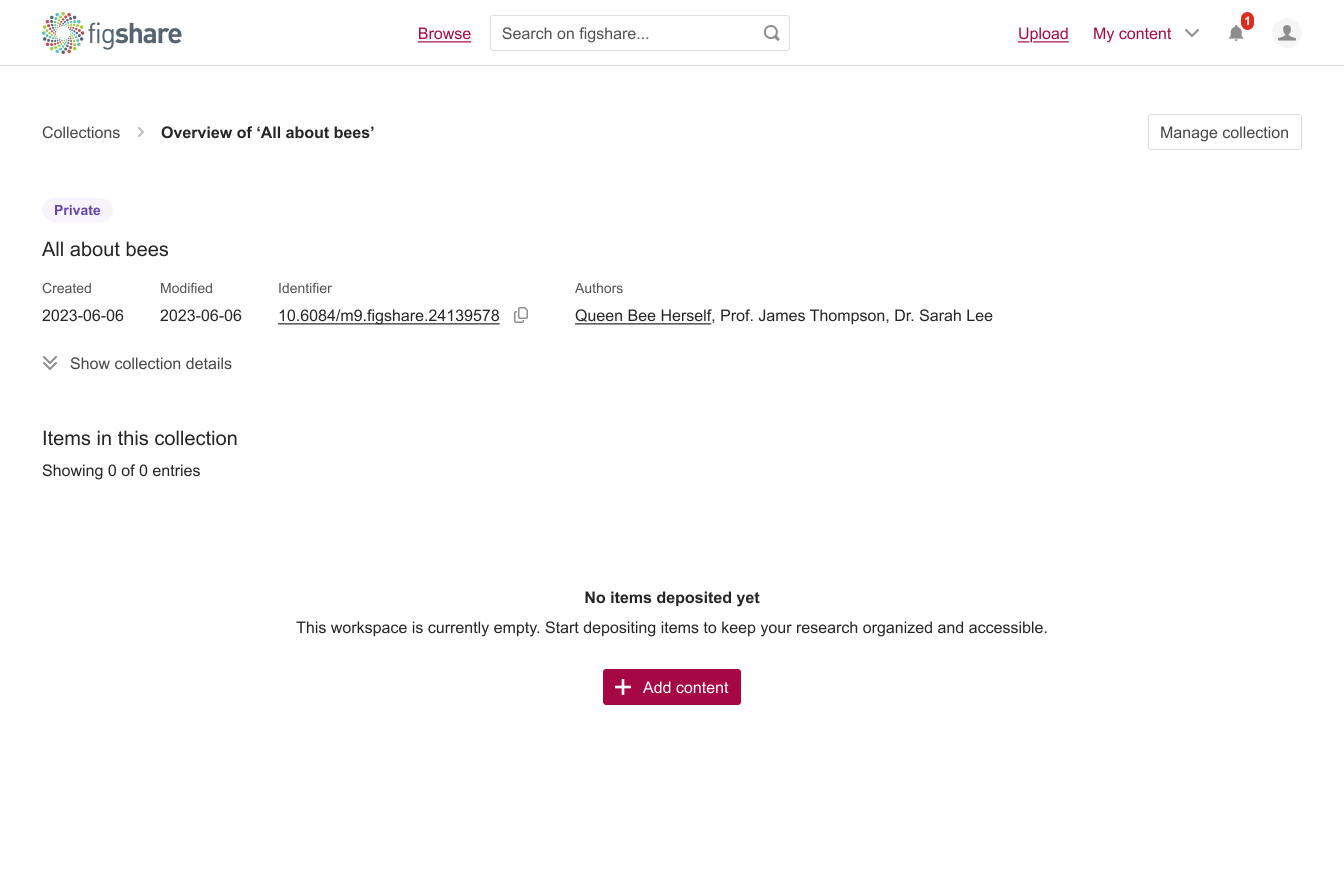
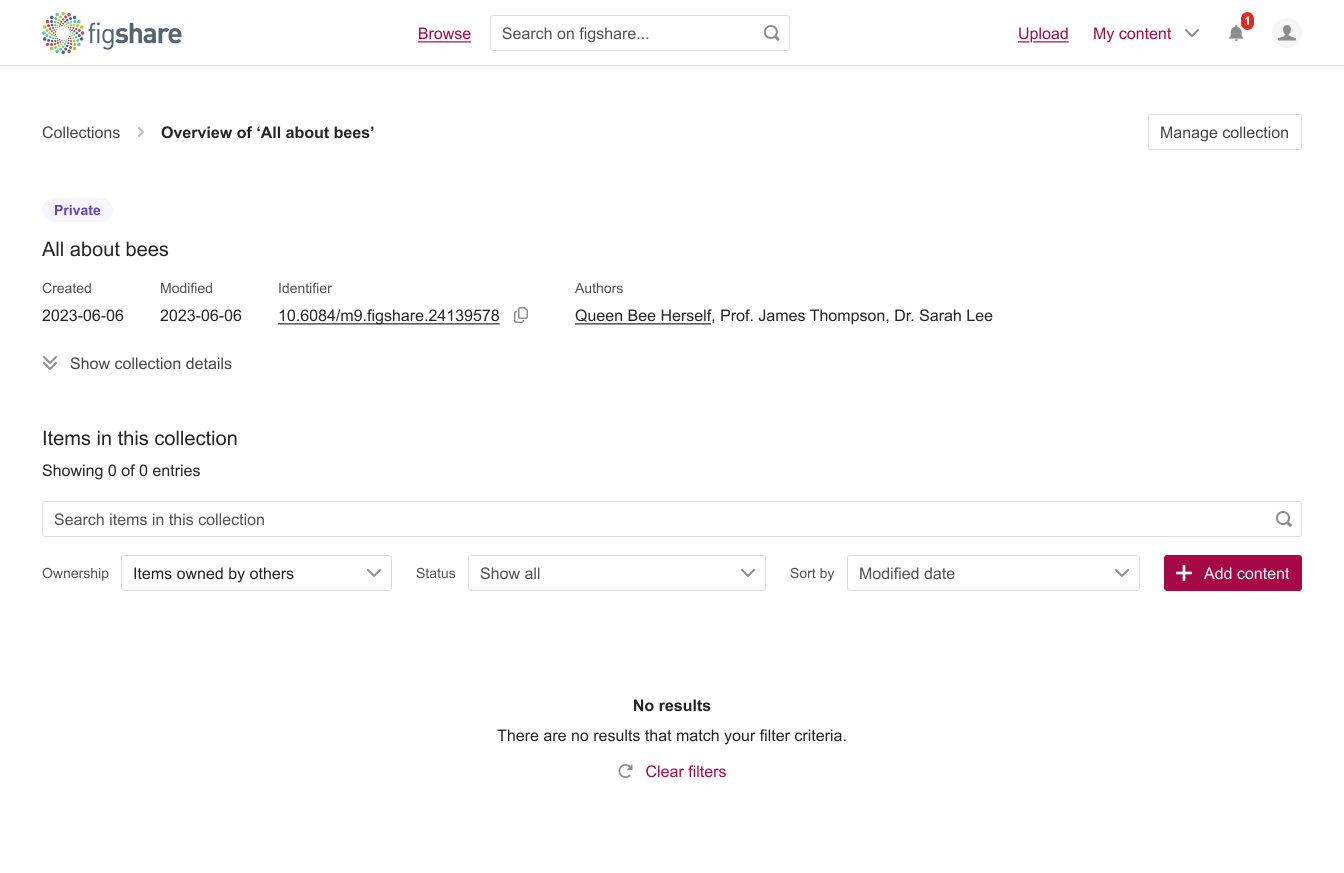
This was mostly backend work to make search and filtering faster, more accurate, and more reliable. While the heavy lifting happened behind the scenes, I tackled the user-facing piece and designed empty states.
Clear persistent identifier communication
Items and Collections all now have a persistent identifier with progressive disclosure and clear visual distinction between identifier types and versioning.
However, after giving it a lot of thought, we decided that giving Projects a DOI would have introduced even more confusion between Projects and Collections. Eliminating one of the two wasn’t an option either as institutions rely on them differently.
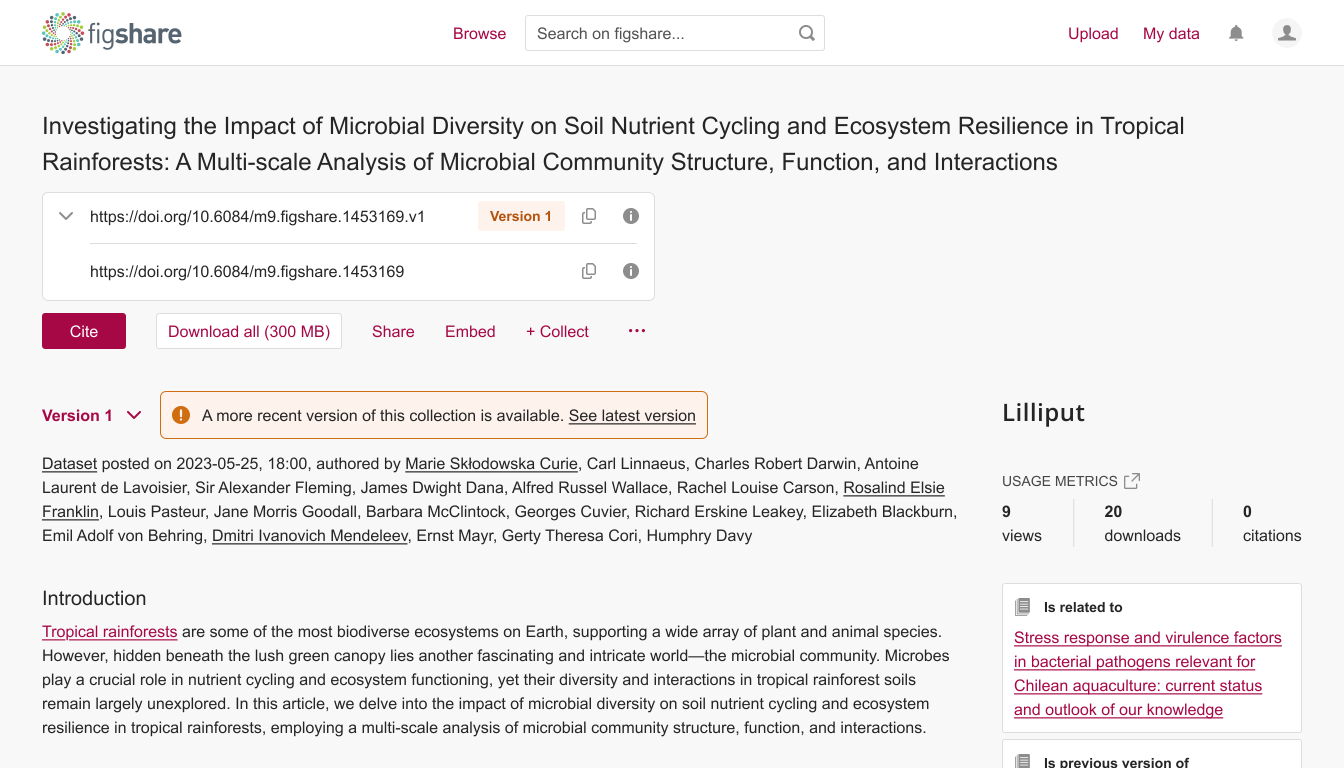
I made sure we documented this as a conscious compromise, not a permanent solution, so we could revisit when we had capacity for larger structural changes.
Clear expectations around collaboration
The support documentation for Projects has been updated to more accurately reflect their purpose: enabling asynchronous collaboration with both internal and external participants.
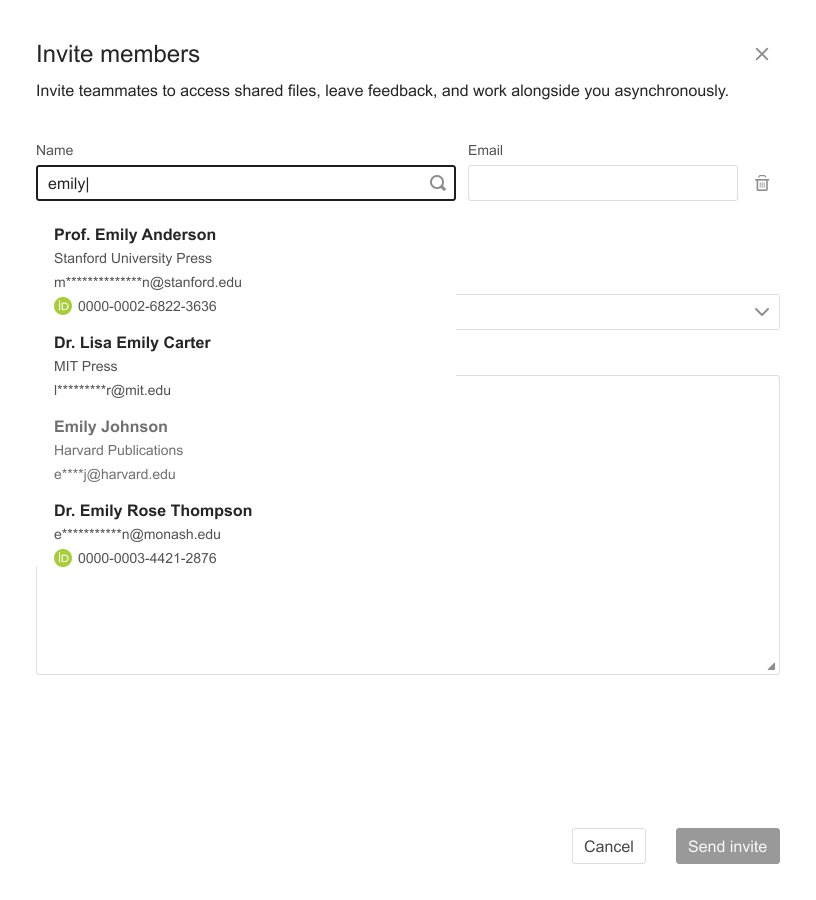
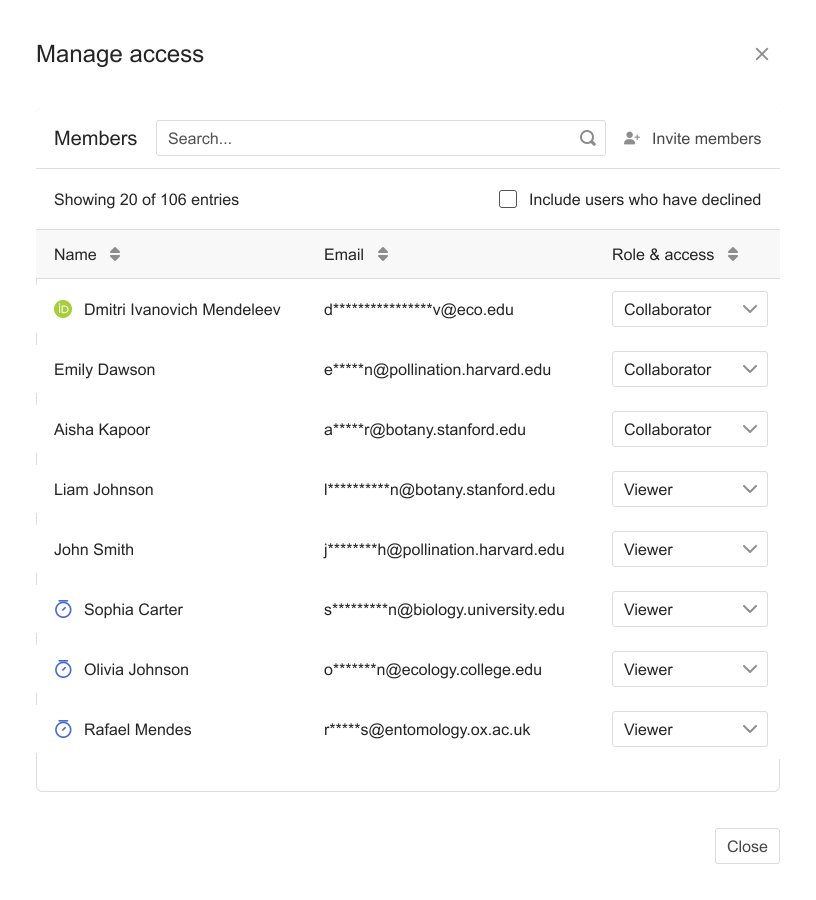
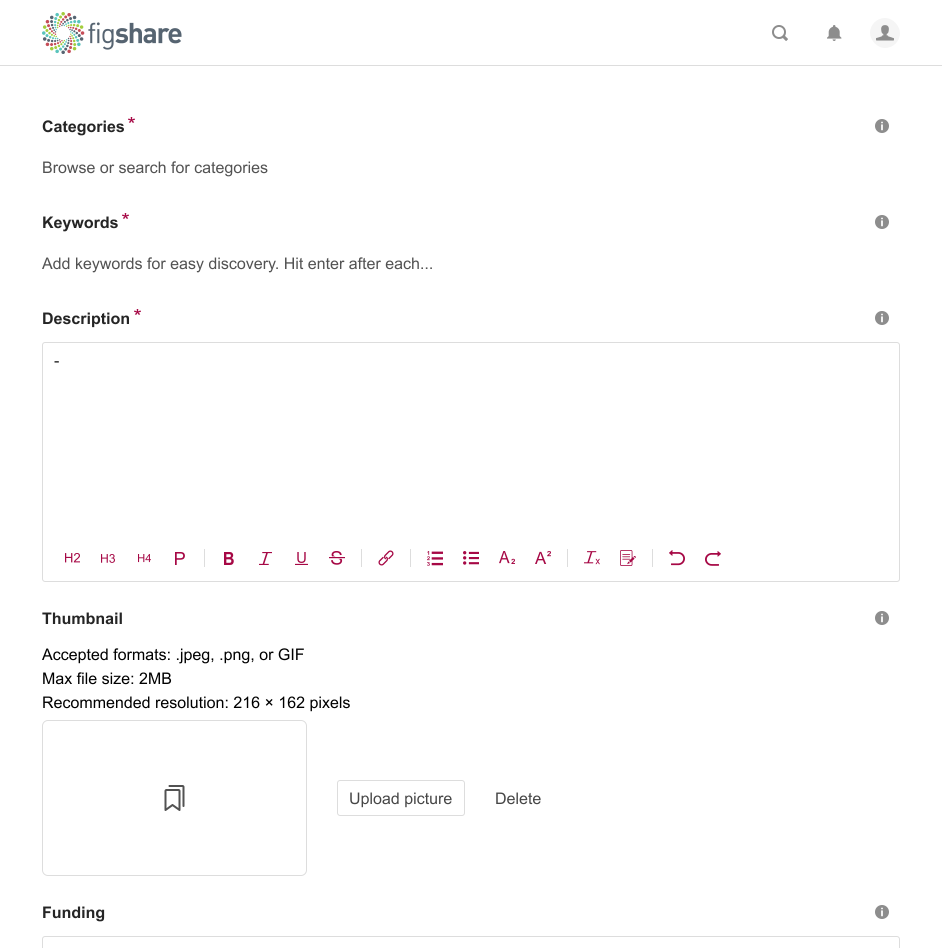
Customization options
Added thumbnail customization and visual presentation controls directly in the UI.
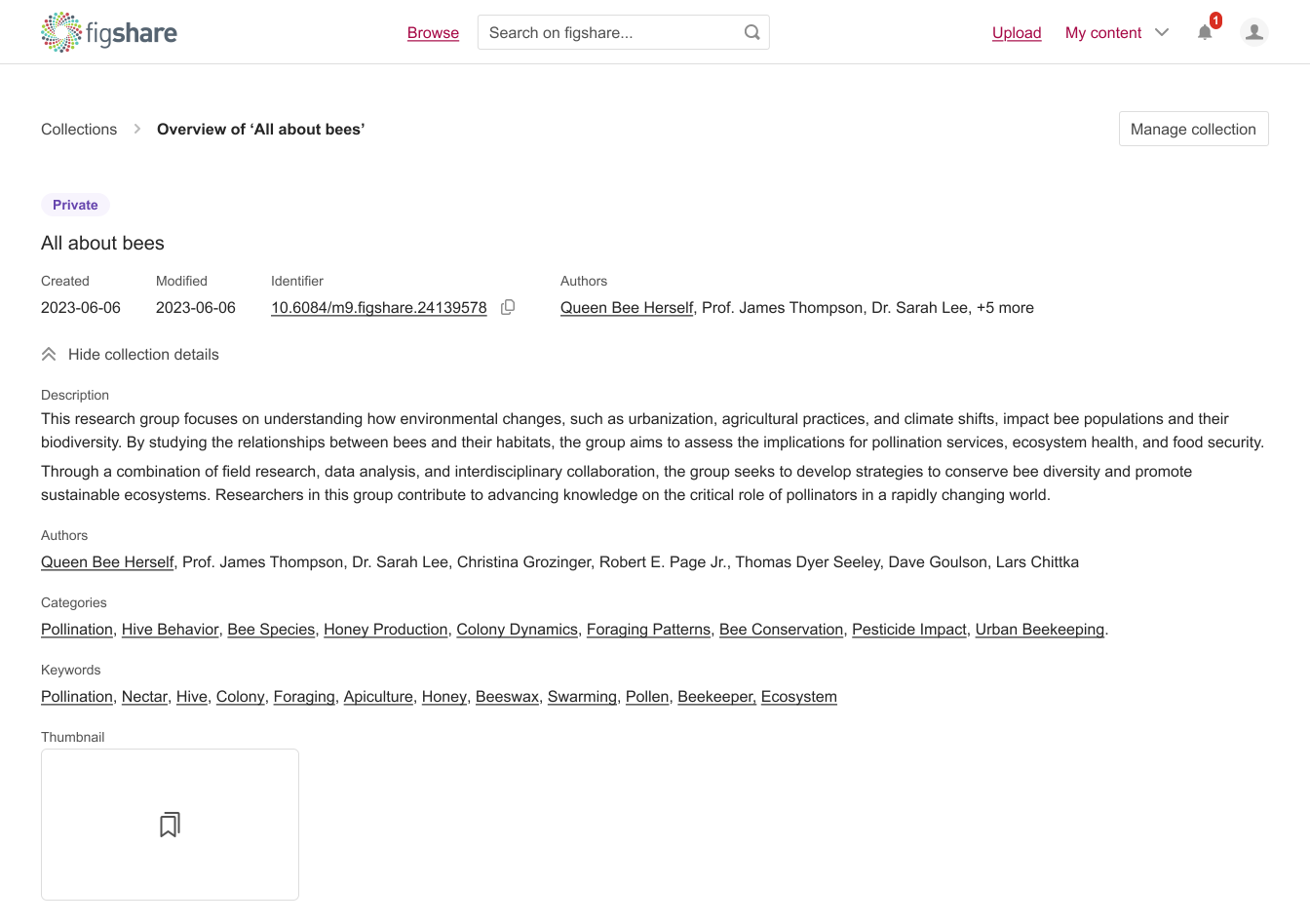
Version state clarity
Designed clear version indicators showing current state of a Collection based on the Items' versions.
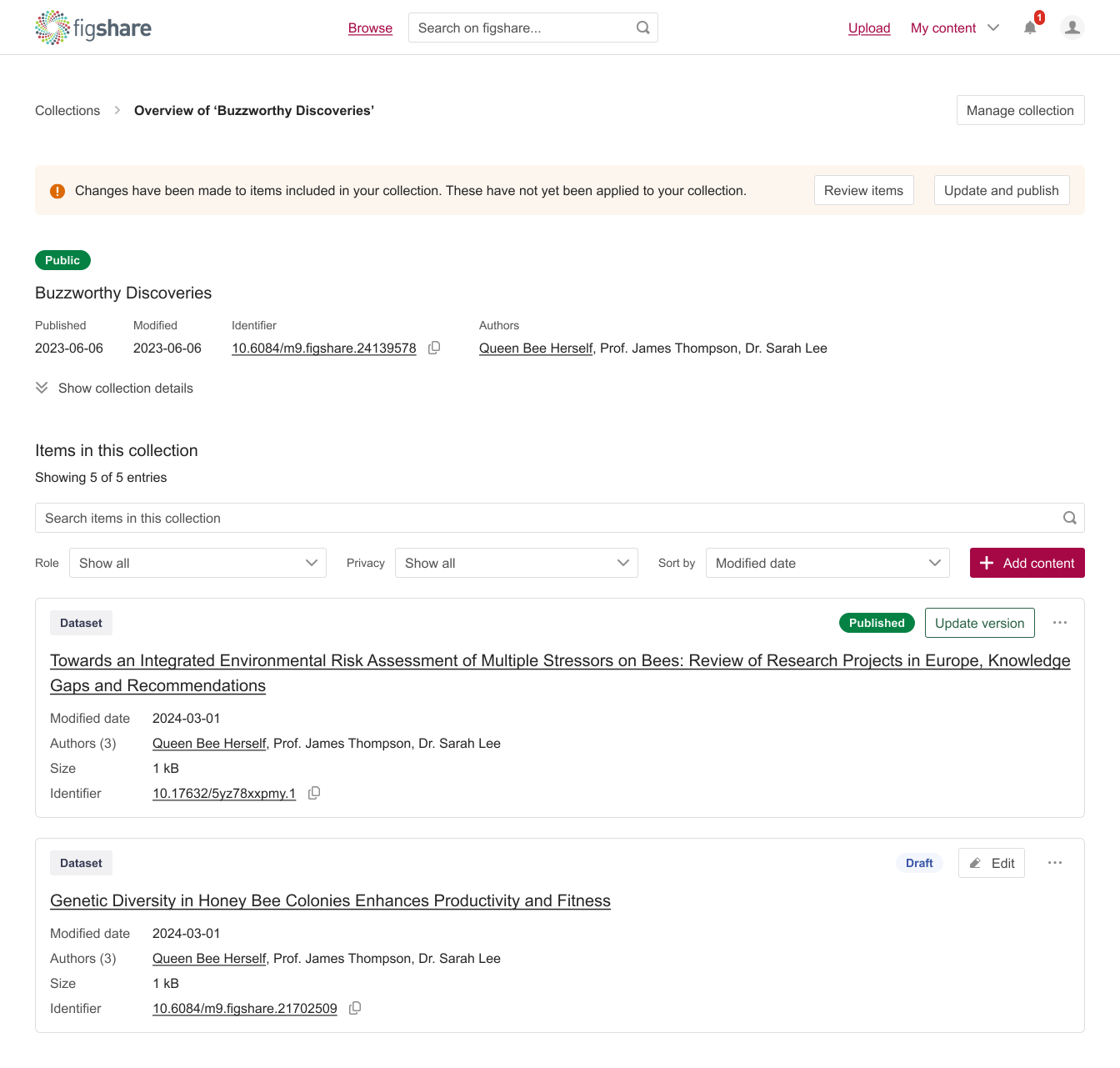
A collection's interface with collection versioning, item versioning, persistent identifiers displayed on collections and items, and progressively disclosed collection details.
Comments, revealed
Switched the terminology from "Notes" to "Comments" to align with user expectations, and surfaced the action more prominently using progressive disclosure across the entire thread.
Validation & results
For the first iteration, I focused just on the Items page. My thinking was that a lot of the features – like search, filter, and sort – could be reused on other pages too. So once I got feedback on how these worked for Items, I could roll out similar designs to other pages. For example, in the second iteration, instead of asking users the whole nine yards about sorting projects – like where to find it, how it works, etc. – I'd just ask them what sorting options they would want to see.
I started by asking users what they thought right off the bat, first impressions, without me guiding them in any direction. I then had them try completing some tasks so I could see how they navigated everything and whether they could finish what they set out to do. I dug into specific features like search, filters, uploading, editing, managing storage, and collaboration.
I showed users an early version of the design. I knew it wasn't anywhere near final, but I didn't want to jump straight to a polished design without getting some feedback first.
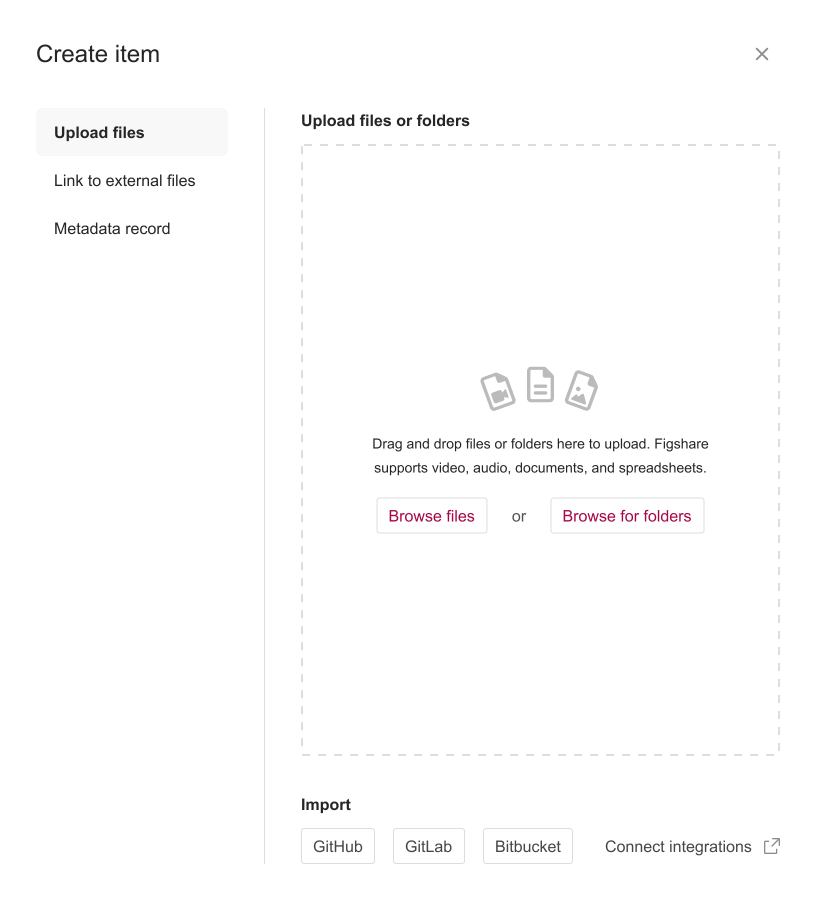
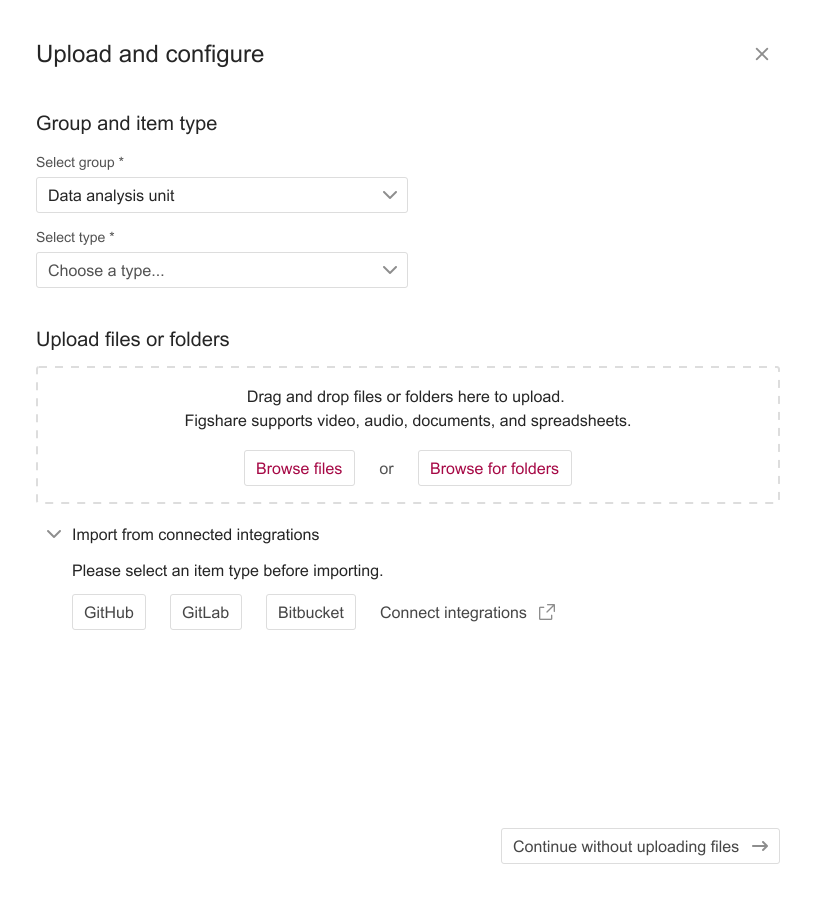
Example of a test of two different ways to upload content.
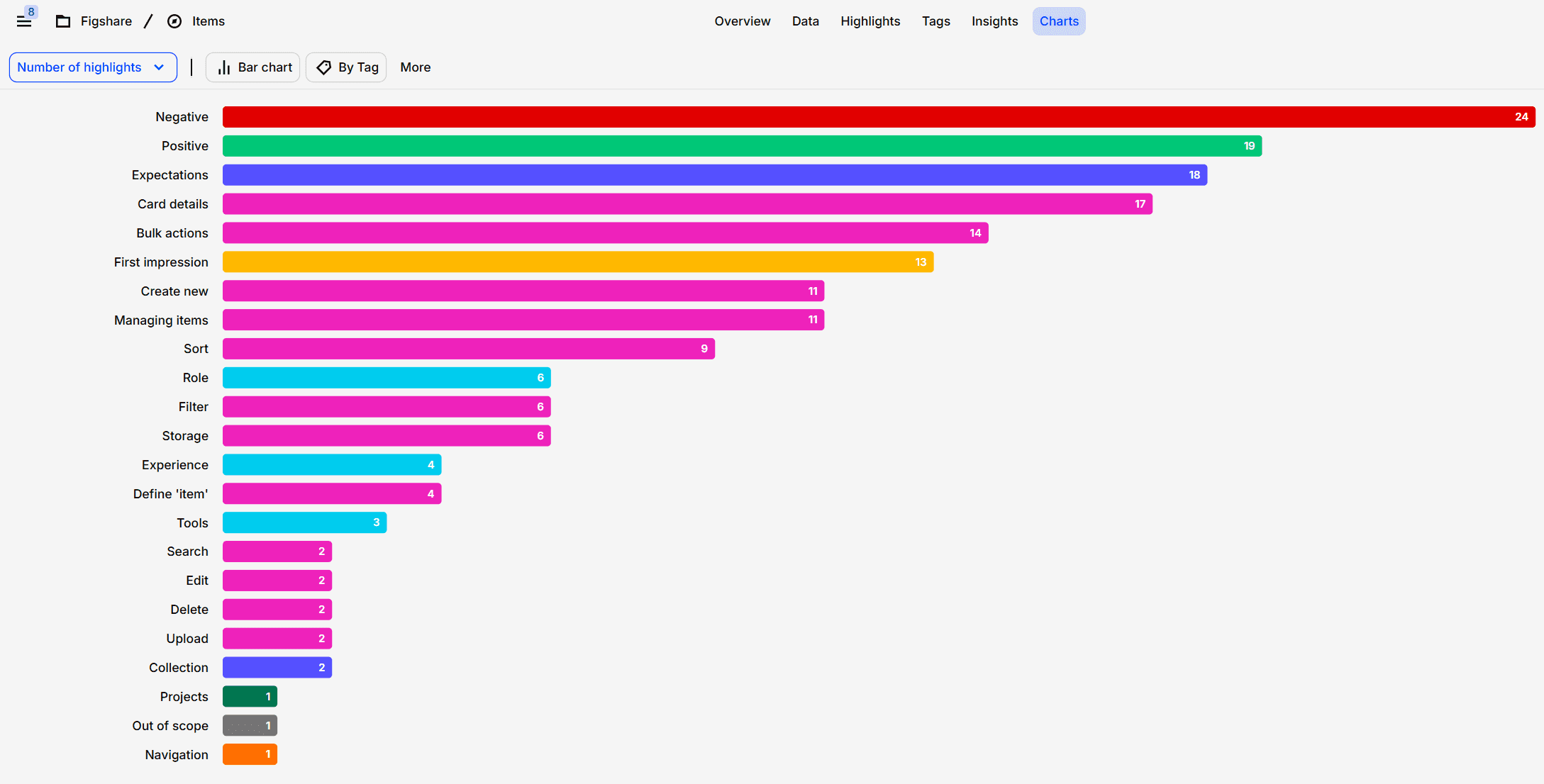
A view of all the highlighted data, sorted by tags.
The first iteration got a lot of negative feedback, but it's okay, we were expecting that. At this point, any feedback is good feedback.
What surprised me was that most of the issues were around wording. I thought the language would be pretty straightforward, but it turned out to be a bigger deal than expected. Users got tripped up on navigation labels, things like "My data" vs. "My content" vs. "Items" left them confused about where to find things and what to expect before clicking. People also didn't get what "Create new" meant, suggesting "Upload" would make way more sense. And then there was the whole "Draft" vs. "Not published" item status. Users couldn't tell the difference between the two.
The second iteration focused on Projects and Collections. By this point, we'd already worked in the feedback we got from testing Items, so these pages were starting with a stronger foundation.
23 usability tests conducted, covering multiple tasks and workflows;
100% task completion rate (up from 60% baseline);
Comment usability: 4/5 (up from 0/5);
Version management errors eliminated (0% vs. 40% previously);
Users reported feeling "heard" in the design.
The third and final round was all about beta-testing. We built out the design we'd been working on and invited 4 institutions to test it out in the real world. The feedback at this stage was pretty focused. Users said the headings for "Items, Collections and Projects" weren't standing out enough, we needed to make those way more obvious. A big one was that users wanted to be able to sort their public records by things like view counts and download counts. This turned out to be a pretty major gap as users really needed this feature to make sense of their content.
Key learnings
Internal teams know where the bodies are buried. Engaging Sales, Customer Success, and Support alongside users gave us critical context about recurring issues, edge cases, and wishes. This prevented us from redesigning things that had already been tried and also helped us design our interview questions.
Map assumptions before talking to users. We documented what we thought we knew about feature usage before any interviews. This became our fact-checking list.
The happy path is a lie. Once you map the ideal workflow, immediately start documenting everything that breaks it. There are always dozens of edge cases, legacy data that doesn't conform to new structures, and seasonal processes only three people know about. Creating an exhaustive edge case inventory early prevents expensive design rework later and helps you prioritize which exceptions to design for versus which to handle through support.
Bundle the research. Instead of separate sessions for pain points, discovery, jobs-to-be-done, and journey mapping, we asked everything in one 60-80 minute conversation. This saved user time, gave us richer context (answers to one question informed others), and let us spot patterns faster.
And still, research takes longer than you think, and that's okay. Recruiting the right participants (not just the eager volunteers) takes time. Contradictory feedback needs synthesis, not immediate resolution. When stakeholders push to skip research and "just start designing," you need to advocate for the time to do it properly, even if it's lean. Answer questions even as mini follow-ups to prevent building on wrong assumptions.
Ship the imperfect MVP. We defined the absolute minimum needed to test our hypothesis and shipped it. You can always add more later. Done and learning beats perfect and theoretical.